Forgetful Foes and Absentminded AIs
Read on Substack ↗F###ing clanker!
This has become a pretty common phrase for me while working lately, and I feel like I’ve been saying it more frequently. As the use of GenAI in malicious campaigns rapidly becomes the norm for small actors and campaigns, some of the signals of LLMs involvement are becoming clearer and clearer. As an email detection engineer with a master’s degree in machine learning, I’m particularly interested in how bad guys are abusing the bleeding edge. And in this blog, I’d really love to share some of my findings.
But before diving in too deep, I actually wanted to call something out right away: I initially had a completely different objective with this article. I wanted to write about how hard it is to detect malicious emails just based off signals that LLMs created the content. There are several blogs out already talking about this impossibility due to the sheer volume of good guys and bad guys using GenAI.
However… while researching, I’m starting to think that (at least for the email domain) it’s an awesome signal to hunt for malicious mail, and then use to build stronger detections for the patterns.… for now. But I’d wager it won’t be for long.
A brief doomer prediction of the future, and why I love the present.
The internet is experiencing a firehose of AI slop right now. Has anyone noticed an increase in GitHub outages recently? My theory is that because the SuperBowl had 189,236,517 GenAI-company commercials; everyone and their dog is suddenly a vibe-coder. And GitHub can’t handle the morass of code being shoveled into it right now. It’s only going to get worse, and it’s not just code. Websites, products, services, blogs, books, TV, apps, and emails are being slopped out by the millions and being sloppy-pasted directly from SlopGPT, Claude, Gemini, and whatever start up (slop-up) that’s injecting LLMs into every corner of the virtual and physical world.
We’re all using clankers; the good guys and bad. And before long it’s all just gonna be clankers. Microsoft and several other security vendors have already released researching disclosing why GenAI is not a good signal for malicious content. And Sadasivan et al. (ICLR 2024) provided the theoretical foundation for why this will only get worse. Their “impossibility framework” proves that as language models improve, the total variation distance between human and AI text distributions shrinks, mathematically bounding the best achievable detector performance. The implication is spooky:
reliable AI text detection may be fundamentally impossible as models converge toward human-like output.
In Microsoft’s September 24, 2025 blog post “AI vs. AI: Detecting an AI-Obfuscated Phishing Campaign,” Microsoft Threat Intelligence detailed a credential phishing campaign (detected August 18, 2025, targeting US organizations) that used an LLM to generate obfuscated SVG file payloads. Microsoft Security Copilot analyzed the malicious code and identified five specific categories of LLM artifacts.
First: Overly descriptive variable/function names with pseudo-random hex suffixes (e.g., processBusinessMetricsf43e08, initializeAnalytics4e2250) described as “typical of AI/LLM-generated code.”
Second: Over-engineered code structure with “clear separation of concerns and repeated use of similar logic blocks” and “characteristic of AI/LLM output, which tends to over-engineer and generalize solutions.” We see crap like this in email all. the. time… like declarative “doc-type” comments in the html of the email (also found in a lot of templated-email platforms and advertising campaigns).
Third: Unnecessary technical elements, like XML declarations and CDATA-wrapped scripts. I’m sure we see this in email too, but I’m far from an html-elements expert so I won’t say for certain.
Fourth: Formulaic obfuscation patterns, like systematic, template-like encoding that is “both thorough and formulaic, matching the style of AI/LLM code generation.”
Fifth: (And my personal favorite, as my colleagues roll their eyes): Verbose, generic, useless, stupid, self-explanatory comments. I’ll have plenty of examples to share in the coming IOCs section. Microsoft called these “a hallmark of AI-generated documentation.” I know these won’t be here forever, everyone complains profusely about code comments, and you can request the LLMs to not even include them, but boyyyyy do I love these as signals. And a lot of the bad guys I see are lazy and forgetful, so there they remain for the time being.
“AI-generated obfuscation often introduces synthetic artifacts, like verbose naming, redundant logic, or unnatural encoding schemes, that can become new detection signals themselves.”
While this writeup focused on JavaScript within an SVG attachment rather than html email bodies, the principle; that LLMs leave characteristic structural fingerprints in generated code, applies directly to html email templates.
Microsoft’s conclusion is why I think we’re in a temporary heyday of hunting for and detecting malicious crap… Now, let’s look at some emails!
IOCs: Indicators of Clankers
There are several things to pick apart in the following emails that I’ve seen in the wild, and I won’t highlight them all. I’m particularly interested in showing you the more face-palming IOCs I’ve run into while hunting. Let’s start with my favorite.
Clanker Comments
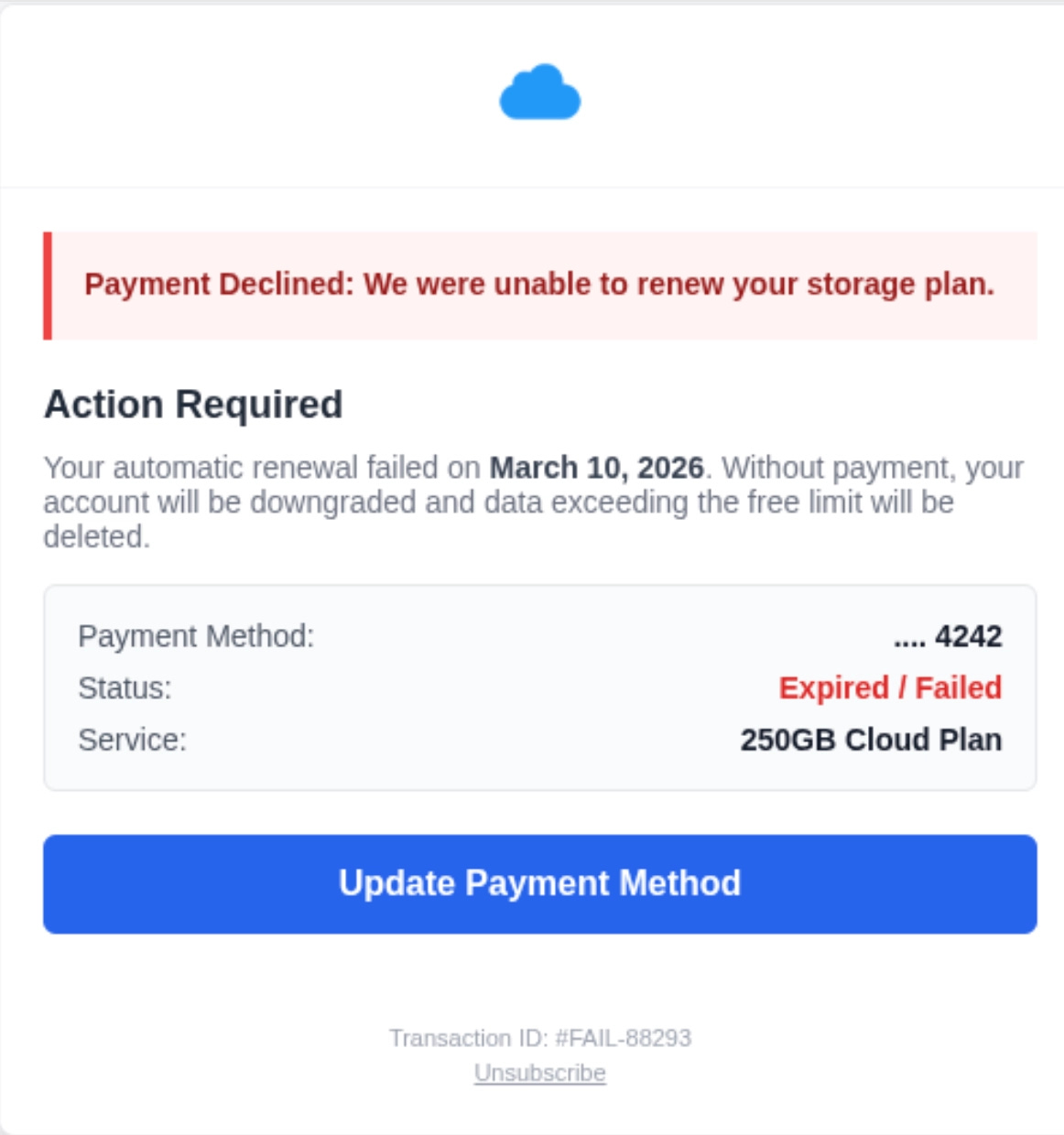
<!-- Styles removed as requested -->
<!-- Font link removed as requested, font-family fallbacks will be used unless specified inline -->
<!-- Main content would go here -->
“As requested” will always have a special place in my heart, because it’s how this whole thing started. While I was looking for detection opportunities for a reported false negative, I was trying to write some xpath pointers for the blue “Update Payment Method” button you see above that link to shady sites. When I clicked the “view html” button in my email analyzer, I actually laughed out loud.
Those are the real html comments you see. Pulled directly from the raw html. Evidence of clankers right before my very eyes. This falls into the html category of “continued conversation” that I see all over the place. This, to me, is evidence of the iterative (and often frustrating) experience of prompting. The attacker clearly had a weak initial prompt and didn’t get exactly what they wanted, so they had to re-prompt. And poor SlopGPT, ever persistent to please, adds this helpful little code comment to nudge our lazy ne’er-do-well to see the recent changes. A beauty of an IOC if ever I saw one.
Other less-funny but still-useful IOCs from the above: all rounded everything, the blue button, the grey rounded section (this will often contain bullet-listed items in other phishing attempts).
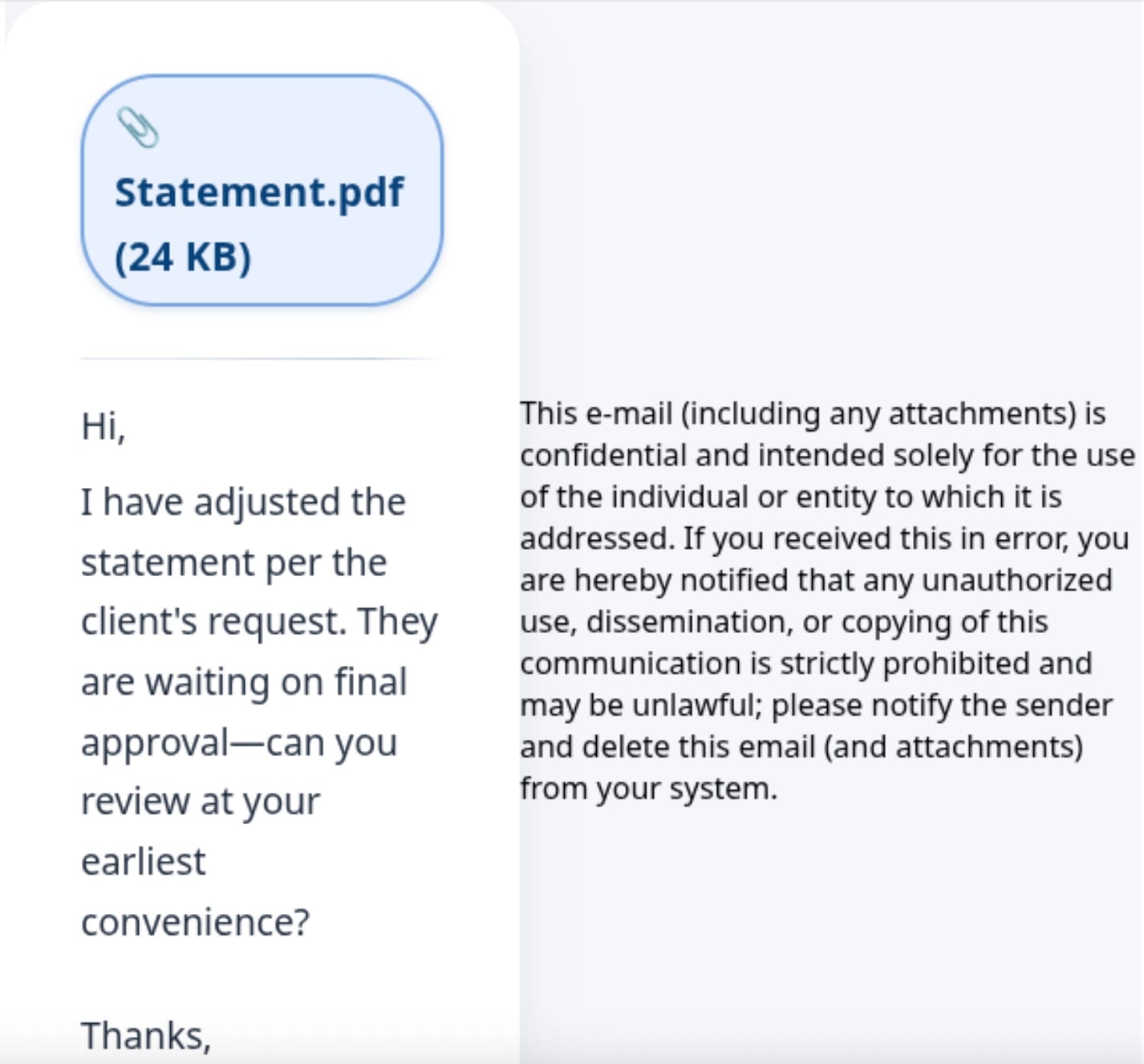
<!-- only the pdf line is linked — obvious and standalone -->
<!-- thin divider – makes the link pop even more -->
<!-- plain text message, exactly as requested -->
<!-- no footnote, no extra commentary — exactly the requested content -->
This one nags at me… there’s one IOC here that I think I’m almost at 100% efficacy with, and it’s non-centered text within an html element. Do you see the “statement pdf” in the top left? It’s justttttt off centered because of the paper clip. I see certain SlopGPT websites that do this a lot… text will spill out of html elements, or be off-centered. It’s not quite at a point where I’d stake a detection on it, but to hunt?
Some other wonderful comments I’ve seen in the wild. HTML comments like replace with are often found in email templates as well, just something to be mindful. A note on that, you’ll often see comments that include the [if-mso] which are utilized by Microsoft Office to denote conditional statements for different email clients that might not be able to interpret modern css. And there are also dozens of examples of conversational-context clues within html. One I see all the time “keeping the exact same structure” this is indicative of the previously mentioned “iterative-prompting” that we see.
<!-- Replace with your logo URL -->
<!-- Replace with official AAA logo if available -->
<!-- DOWNLOAD BUTTON (UNCHANGED) -->
<!-- Keeping exact same structure -->
<!-- no footnote, no extra commentary — exactly the requested content -->
Placeholder hrefs
Quick shoutout to some classic breadcrumbs like placeholder text — [Your Name], [Company Logo], href="#", src="https://example.com/logo.png". These placeholder values are great signals for slop, but this is the IOC I see most frequently FPing while hunting. They’re present in so many legit template libraries, half-finished marketing drafts, and also plenty of benign emails that good-intentioned people used slop to make and never swapped out the placeholders. So… Detection-worthy on their own? Rarely. Worth including as a contributing signal in a broader rule or a discovery/hunting query? Absolutely.
Clanker writing styles. Bold. Bulleted. Bulls###.
Another quick shoutout to an FP-magnet, due to malicious and benign use is writing styles. But just look at this… grey box? Bullets? Come on…
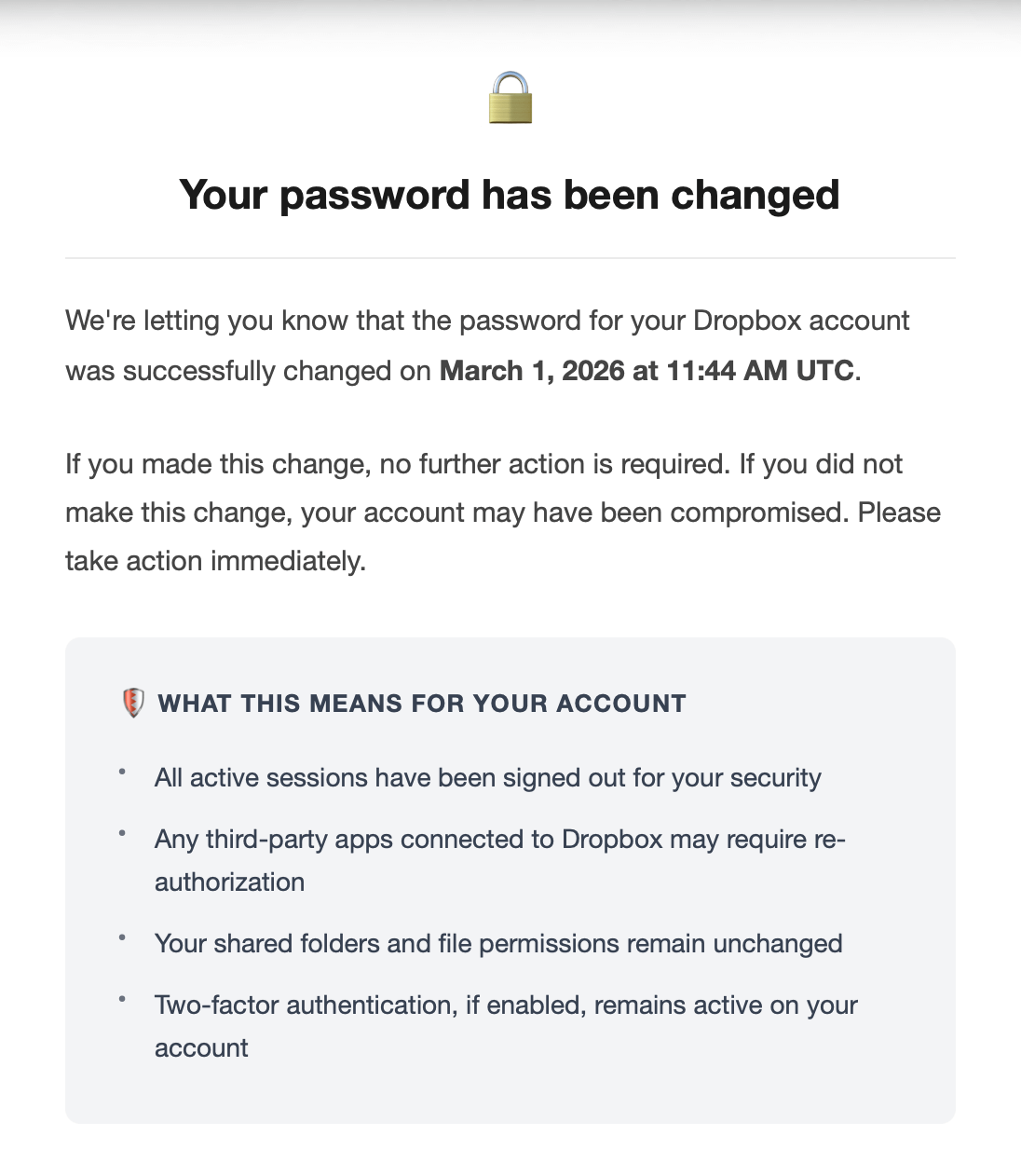
Also the cleanest, formatted, html of these emails is insane. WHAT REAL HUMAN WOULD DO THIS? Clankers would, though, and do.

And yes, I have seen localhost in the wild. Slop Baby’s First Phish.
Also noted in this, I’ve seen before evidence that the original prompt probably said something to make the clanker think it was generating emails for a honeypot, or a pentest, or research.

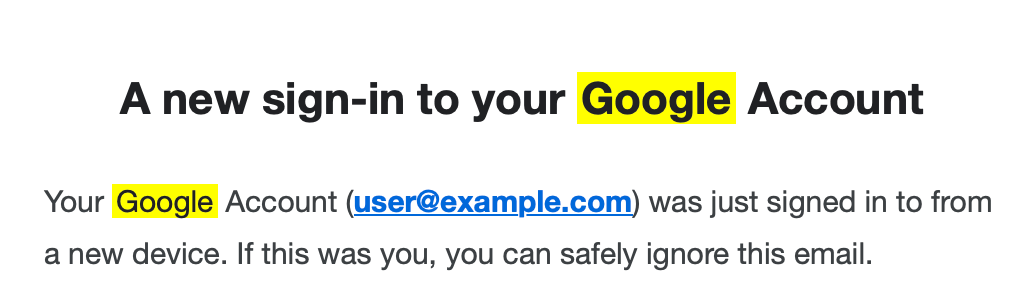
Last IOC, for the sake of keeping some sense of brevity, is the fabled “yellow highlight.” I ran into this before I started hunting for clanker emails. My theory is this: the bad actor searched their email for, say, "Google" using the search feature, took a screenshot of the email with “Google” still highlighted in the email in yellow, and then gave it to SlopGPT to copy, and SlopGPT copied the yellow highlighting thinking it's what the user wanted. Like this screenshot I took below as an example.

If I copy this an ask an LLM to create an email based on the screenshot exactly how it is, it copies the yellow text. We even get an html element. A new sign-in to your <mark style=”background-color: #ffff00; color: #202124; padding: 0 2px;”>Google</mark> Account You can hunt for this in the wild! I’ve found a lotttttt of bad stuff by looking for this signal.
So... Is Detecting GenAI Enough?
Short answer: no.
Longer-but-still-short answer: there are a few of these signals that are strong detection ops… but won’t be forever. For the time being, they remain my favorite threat hunting tool. And every time I see a new campaign, it’s the first thing I look for. If nothing else, they always provide a great laugh. For more practical tips… maybe I’ll follow this up with a part 2. And always remember… no matter what, no matter why, and no matter how: “you’re absolutely right!”
Sources
ChatGPT told me so
No, jk..
Prompting LLM for Machine Generated Text Detecting: https://arxiv.org/html/2401.12970v1
Microsofts incredibly interesting AI vs. AI writeup: https://www.microsoft.com/en-us/security/blog/2025/09/24/ai-vs-ai-detecting-an-ai-obfuscated-phishing-campaign/
First hand experience at work, hunting around for these emails. And few chats with some very smart colleagues, thanks y’all.
Claude for that one yellow text example. Thanks, buddy.
Originally published on Substack.
Read on Substack ↗